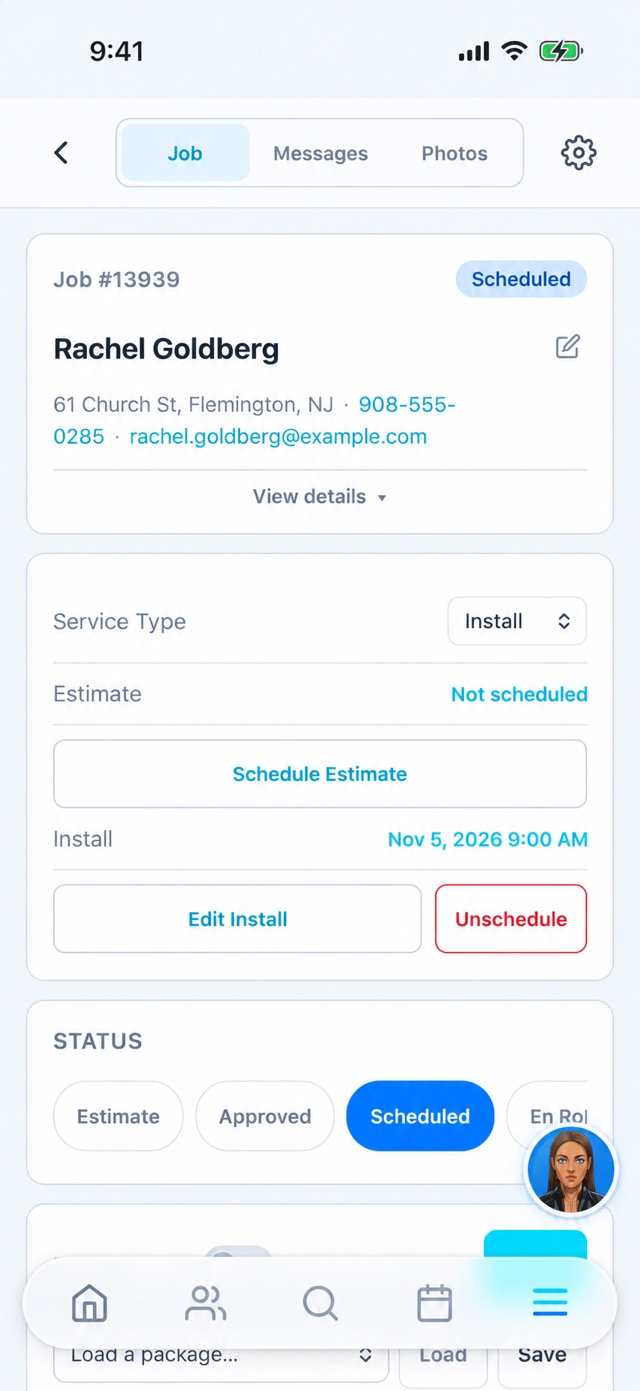
Payroll should not begin with remembering Monday.
When hours, job progress, and receipts arrive in separate text threads, an office person has to reconstruct the week. Recording work as it happens gives the team a better starting point for reviewing hours, answering questions, and resolving missing details.
What this looks like in practice.
Assign the people responsible
Put the lead installer and technicians on the job, and confirm the date and scope. Use the appropriate roles for the team so each person gets the access needed for their work. Every plan lists unlimited users.
Capture the work in the app
Use the mobile workflow to view assigned jobs, record job updates, and attach photos or notes. Clock entries and location context help document the day. Location behavior depends on app permissions, clock state, and configuration.
Review before the week closes
Check timesheets, exceptions, receipts, and completed jobs while the details are fresh. Staff can use My Hours and My Pay where enabled. Resolve corrections with the employee before treating a time record as ready for payroll.
Introduce one clear field routine.
Teach a repeatable sequence: check the job, start the work, capture the important details, and finish with the office’s required information. Agree on what happens when reception or permissions cause a problem. A field app is most useful when everyone understands the same completion standard.
Keep the handoff clear
- Assigned jobs and context on the phone
- Time entries and staff hours visibility
- Job notes, photos, and completion details
Before you get started.
Does every installer need a paid seat?
No. The published plans include unlimited users. Assign individual logins and appropriate roles so actions and work remain attributable to the right person.
Does location replace reviewing timesheets?
No. Location is useful context and depends on device permissions and app behavior. Review exceptions with the employee rather than treating a missing point as proof of what happened.